 In the physical world, we understand the difference between Renting an apartment and Buying a house.
Renting offers flexibility, but you never own anything. Buying requires a big payment upfront, but you own the asset forever.
For decades, we “bought” software. You paid for a CD-ROM of Windows or Office, installed it, and owned it for 10 years.
But today, Microsoft (and Adobe) desperately want you to become a Renter. They want you to pay a monthly “Subscription” fee for the rest of your life.
This leads to the most common question I get asked:
“Should I pay $70 a year for Microsoft 365, or should I just pay $150 once for Office 2021?”
I sat down and calculated the 5-Year Cost of Ownership for both options. The answer depends entirely on one specific feature (and it’s not Word or Excel).
Here is the “Smart Price” guide to the Office dilemma.
1. The Contenders: What are you actually paying for?
First, let’s clear up the confusion. The software looks almost identical, but the payment model is different.1
Option A: Microsoft 365 (The Subscription)
-
Cost: ~$70/year (Personal) or ~$100/year (Family).
-
What you get: Word, Excel, PowerPoint, Outlook.
-
The Bonus: You get updates forever (new features) and 1TB of OneDrive Cloud Storage.2
-
The Catch: If you stop paying, the software stops working. You are renting.
Option B: Office Home & Student 2021 (The Purchase)
-
Cost: ~$150 (One-time payment).3
-
What you get: Word, Excel, PowerPoint. (Usually no Outlook).
-
The Bonus: You own it. It works offline forever.
-
The Catch: No major feature updates. No 1TB cloud storage.
2. The 5-Year Financial Breakdown
Let’s look at the math over a typical computer lifespan (5 years).
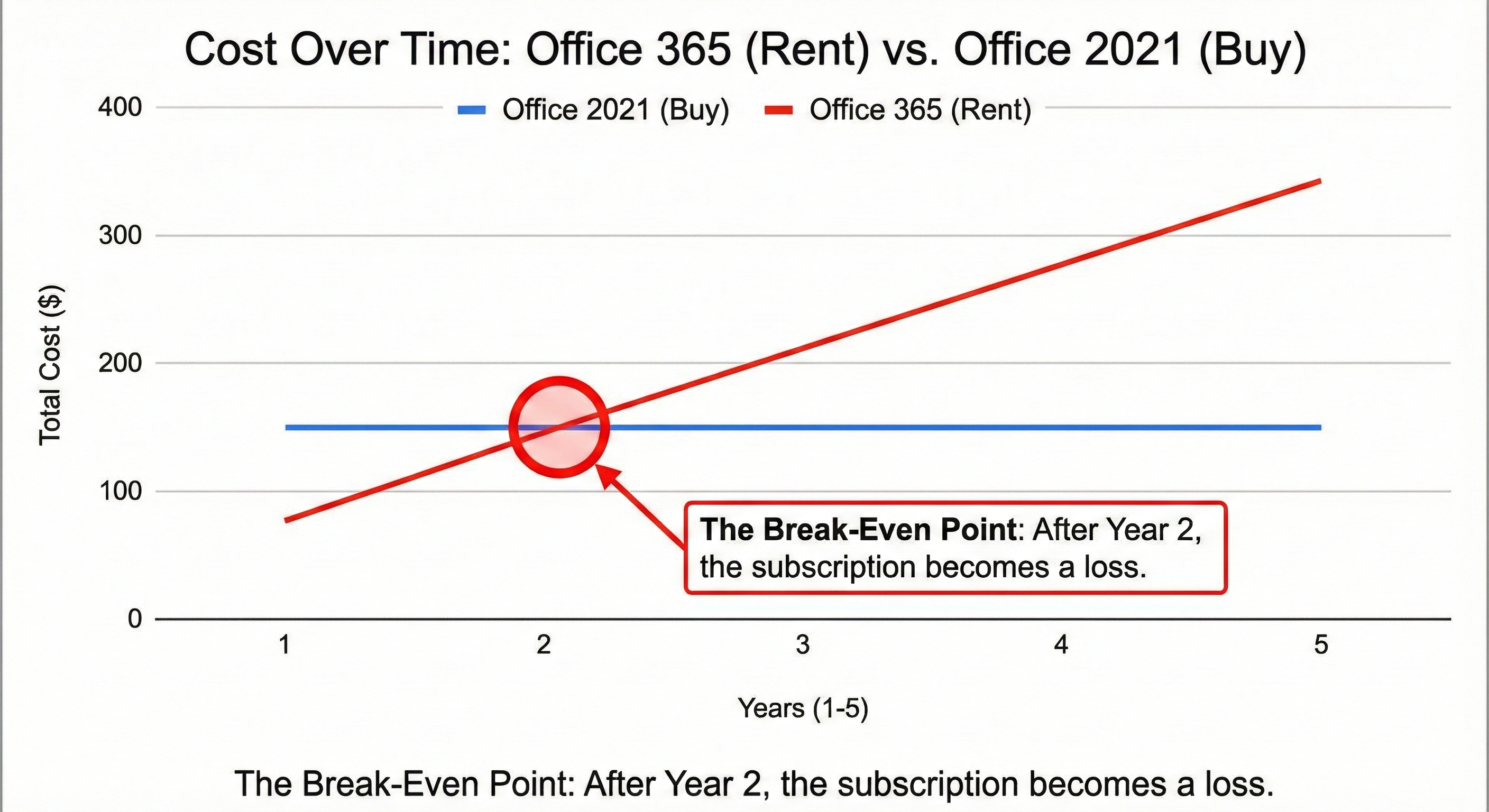
| Time Period | Office 365 Personal ($70/yr) | Office 2021 ($150 one-time) | The Difference |
| Year 1 | $70 | $150 | Buying is harder (-$80) |
| Year 2 | $140 | $150 | Almost equal |
| Year 3 | $210 | $150 | Buying saves $60 |
| Year 4 | $280 | $150 | Buying saves $130 |
| Year 5 | $350 | $150 | Buying saves $200 |
The Mathematical Verdict:
If you only care about typing documents and making spreadsheets, the Subscription is a bad deal. Over 5 years, you will pay more than double the price of the perpetual license.
From a pure “Software” perspective, buying the license (Office 2021) is the clear Smart Price winner.
3. The “Cloud” Variable (The Only Reason to Subscribe)
However, the math changes completely if you use Cloud Storage.
Microsoft 365 includes 1TB (1,000 GB) of OneDrive storage.4
If you were to buy 2TB of storage from Google Drive or Dropbox, it would cost you roughly $100 per year just for the storage.
So, let’s re-calculate the value:
-
Microsoft 365 Price: $70/year.
-
Value of 1TB Cloud: ~$60/year.
-
Effective Cost of Office: $10/year.
My Analysis:
-
If you need 1TB of cloud backup for your photos and files, Microsoft 365 is actually an incredible bargain. You are basically buying cheap cloud storage and getting Word/Excel for free.
-
If you do NOT need cloud storage (or if you already pay for iCloud/Google One), then Microsoft 365 is a waste of money. You are paying for storage you don’t use.
4. The “Feature Fear” (FOMO)
Microsoft marketing tries to scare you. They say: “Buy 365 to get the latest AI features and updates!”
But ask yourself: How do you actually use Word?
Do you use advanced AI copilots and real-time collaboration tools? Or do you just type text, bold some headings, and save as PDF?
For 99% of students and home users, the version of Word from 2016 is still perfectly fine. A letter typed in Office 2021 looks exactly the same as a letter typed in Office 365. Do not pay for “Updates” if you don’t use the advanced features.
5. The Third Option: $0 (LibreOffice & Google Docs)
Before you spend $150 or $70, we must mention the true “Smart Price”: $0.
Unless your job requires perfect formatting compatibility with Microsoft files, most people can survive on:
-
Google Docs: Free, cloud-based, great for simple writing.
-
LibreOffice: A free, open-source downloadable program that looks just like Microsoft Word.6
I used LibreOffice for two years. It opens Excel files, it opens Word files, and it costs zero dollars.
Conclusion: Which One Should You Buy?
I have created a simple decision matrix for you.
Buy the Subscription (Microsoft 365) IF:
-
You need 1TB of Cloud Storage for backups.
-
You have a family (The “Family Plan” allows 6 people for ~$100/yr, which is an amazing deal per person).
-
You use Outlook for email management.
Buy the License (Office 2021) IF:
-
You are a single user.
-
You don’t care about OneDrive (or you use Google Drive).
-
You want to pay once and never think about it again.
-
You hate monthly bills.
My Personal Choice:
I eventually switched to the 365 Family Plan. Why? Because I split the cost with 5 family members.
$100 divided by 6 people = $16 per year per person.
At that price, renting is smarter than buying. But for a single person? Stick to the one-time purchase.