It happens to everyone. You snap a photo, or try to save a document, and you get the dreaded notification:
“Storage Full. Upgrade to Google One for just $9.99/month to keep backing up.”
In that moment of panic, $10 feels cheap. You want your photos safe, right? You want that red notification to go away. So you enter your credit card details.
Congratulations, you just signed a lease for a digital apartment that you can never leave.
I faced this decision last month when my 15GB of free space ran out. Instead of instantly upgrading to the 2TB plan, I sat down and calculated the “Rent vs. Buy“ equation for data storage.
Here is why I bought a physical drive instead of paying the “Cloud Landlord.”
1. The Math: $10 vs. $600 (The Long Con)
Cloud storage companies (Google, Dropbox, iCloud, OneDrive) bank on you ignoring the long-term math. Let’s look at the standard “2TB Plan” across most services. It usually costs $9.99 per month.
That seems affordable. But data storage is a long-term need. You need to keep those baby photos for 20 years, not 20 days.
The 5-Year Calculation:
-
Cloud Option (2TB): $10/month x 12 months x 5 years = $600.
-
Physical Option (2TB SSD): One-time purchase of a portable SSD (like a Samsung T7 or SanDisk) = $110.
The Verdict: The Cloud option is 545% more expensive over 5 years. If you pay for the Cloud, you are re-buying that hard drive every single year, forever. If you stop paying in Year 4, they hold your data hostage until you pay again.
2. The Speed Factor: Why “Cloud” is Actually Slow
We often think the Cloud is “magic.” But the Cloud is just a computer in someone else’s building. To get your files onto that computer, you have to push them through your internet connection.
-
Scenario: You want to back up 50GB of 4K video from your holiday.
-
Cloud Upload: On a standard home Wi-Fi, this could take 5 to 10 hours.
-
Physical SSD: Plugging in a USB-C drive? It takes 3 minutes.
If you work with video or large photo libraries, the Cloud is a bottleneck. The “Smart Price” is not just money; it is speed. A physical SSD is instant.
3. The “Hybrid” Strategy (How to Pay $2 Instead of $10)
I am not saying the Cloud is useless. It has one killer feature: Off-site Safety. If my house burns down, my physical hard drive melts. My Google Drive survives.
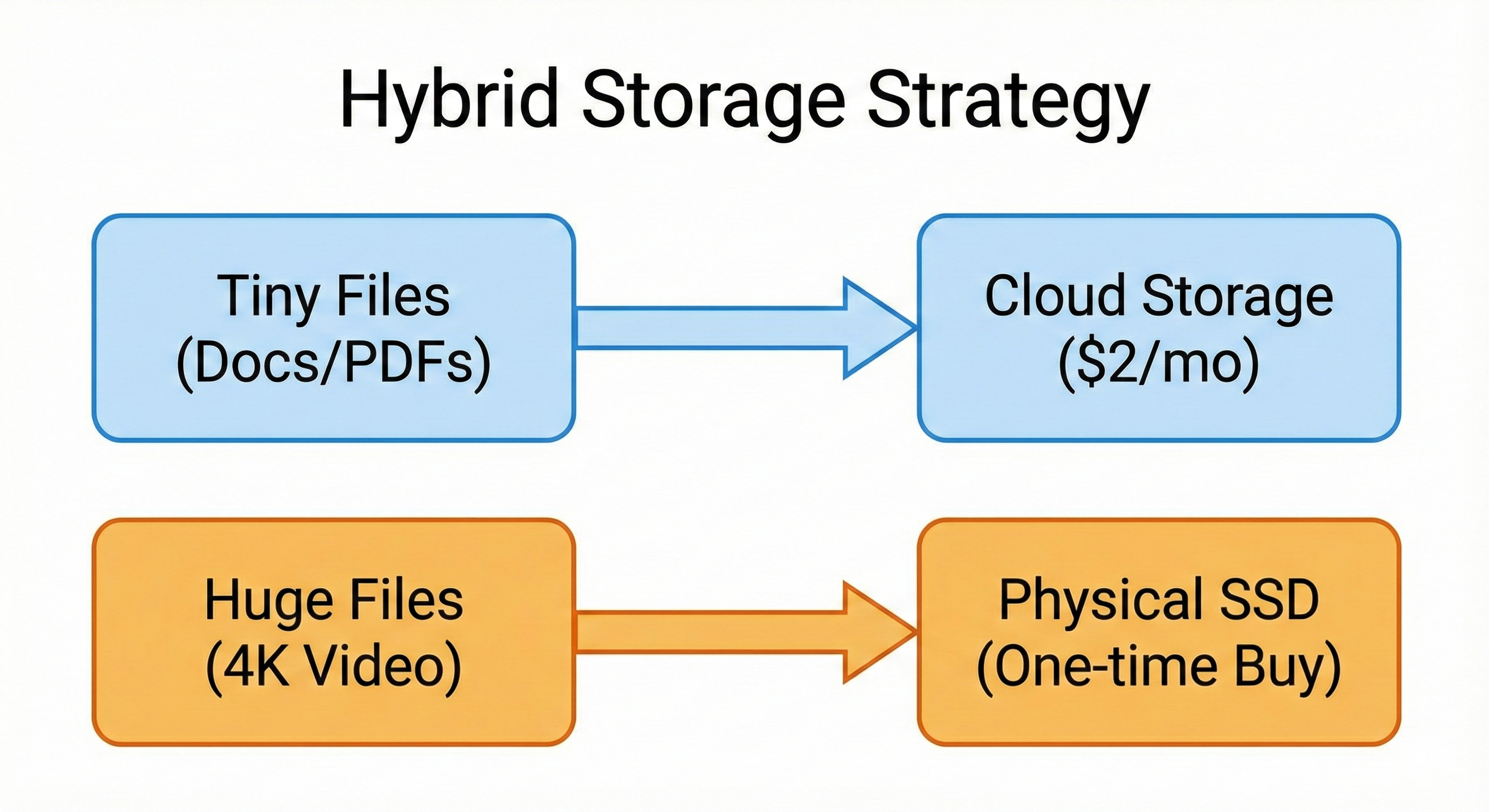
So, I developed a “Hybrid Smart System” to get the best of both worlds without paying the “2TB Tax.”
The Rule:
-
Documents go to the Cloud: Word docs, PDFs, and essential spreadsheets are tiny. You can store millions of them on the cheap 100GB Plan ($1.99/mo).
-
Media goes to the Drive: 4K videos and RAW photos are huge. They eat space. I move these offline to my physical SSD ($110 one-time).
The Savings: By moving the heavy media files offline, I don’t need the expensive $10/month tier. I stay on the cheap $2/month tier.
-
Old Cost: $120/year.
-
New Cost: $24/year + One-time Drive purchase.
4. The Privacy Argument
This is not an economic point, but it is a value point. When you put your photos on a Cloud service, you are putting them on a server that scans your data. We have all heard horror stories of people getting locked out of their Google accounts because an AI bot flagged a photo of their toddler as “inappropriate.”
When you own the Hard Drive, you own the data. No AI scans it. No monthly bill locks it. Nobody can shut down your account. There is a financial value to “Peace of Mind.”
5. The One Downside: You Are the Manager
The only reason to pay the premium for Cloud is laziness (and I mean that in a nice way).
-
Cloud: “Set it and forget it.” It backs up automatically while you sleep.
-
Physical: You must remember to plug the drive in once a week.
Is remembering to plug in a cable worth saving $500? To me, yes. I set a recurring reminder on my phone: “Sunday 9 PM: Backup Phone.” It takes 5 minutes. That 5 minutes earns me the equivalent of $100/year in savings.
Conclusion: Stop Renting Space for Archive Files
Think of your data like your winter clothes.
-
Do you rent an expensive extra bedroom just to store coats you wear once a year? No. You put them in a box in the attic.
Cloud Storage is for files you need every day (active documents). Physical Storage is for files you need someday (old photo archives).
Don’t pay “Penthouse Rent” for “Attic Storage.” Buy a fast SSD, back up your photos, and cancel that expensive 2TB plan.